After a couple of exchanges and about 2 weeks of waiting for parts, my new computer is complete.
Originally, I wanted a small, simple linux box to sit next to my TV and act as a media center, but later decided that wasn’t the best choice due to my TV being a low resolution SDTV. But I still had the “I need a new home computer” mindset, so I ended up building a gaming computer.
Before building this computer, I only had 2 computers. One is an old 1.8 Ghz AMD Duron box running Kubuntu. Over the years it had become a server, used for file storage, testing website stuff locally, and running an irc bot and bnc. The other is my 1 and a half-year old laptop that used to be one of the best for mobile gaming and now can’t even run Bioshock on the lowest settings without having framerate problems. Plus the laptop is owned by the school district I work for, so it’s not technically mine. But I do have a lot of freedom with it, such as installing games, music, etc. I could even run linux on it if I wanted to. As long as I can do my work on it.
I’ve gutted old computers and put together working ones from the parts, but this was my first experience putting together a brand new one from the ground up. Everything was bought from Newegg.
I’ll be record-happy for a while as I continue to play with my new capture card.
These are two videos I recorded of the popular swing glitch in GTA IV.
I recently built a new computer from the ground up, and one of the specific things I wanted was a video capture card so I could record online sessions in GTA IV, Halo 3, and such where we've been screwing around. This one is from a saved Halo 3 film from when me, Spikey, and lagman played co-op campaign until lagman suddenly went AFK for about 40 minutes.
<@SpikeyNDS> you should make a blog post with the vid, Samutz
I'm the blue elite, lagman is the arbiter, and Spikey is Master Chief, but inside a Hornet most of the time. Unfortunately, YouTube's processing fucks up the the bits at the end when it speeds up the video.
Today, I’m introducing a new tool that allows you to convert your bookmarks from common web browsers to the format used by Safari on the iPhone/iPod Touch. Click the link below for all the details and instructions.
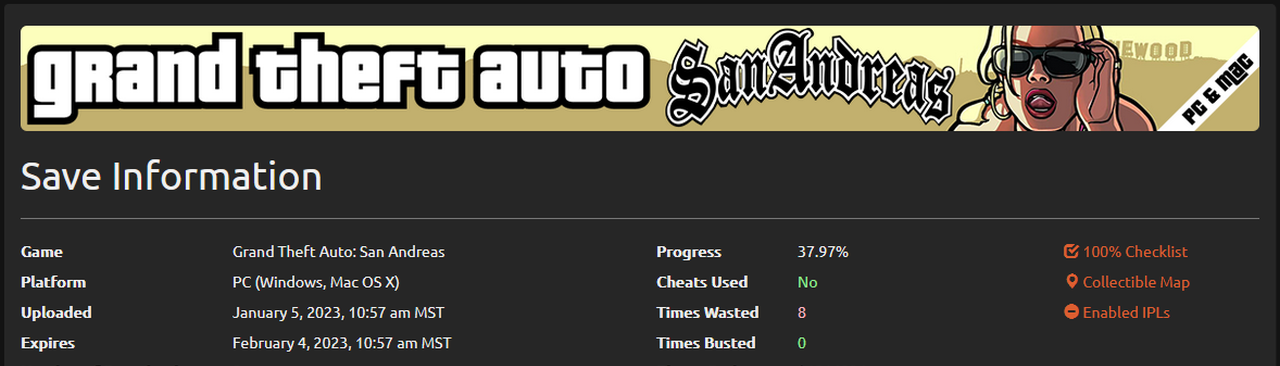
Forgot to write about this before, but this past Wednesday the new version of GTASnP.com went live.
The site has been completely re-written from the ground up.
This is something I’ve wanted to do for over a year now as the code was over 3 years old and messy and my experience has grown a lot since the site’s launch.
Along with the obvious new visual design, the site now has a number of new features:
Download page displays BBCode and HTML links to share the save.
Added more information to display from SA save files, such as progress and other info useful to chain-gamers. Thanks to hmvartak.
The new information is gathered using functions based on the scripts he gave me.
Added user options: Auto-Download Slot, Display Extra Info, Custom BBCode for SnP Helpers and Chain-Gamers
Options page also displays users’ last 10 uploads.
GTA III and VC saves now display the last completed mission (just like SA saves have for a while).
Added support for uncompressed SA-PS2 save files. Requested by OrionSR
Files now expire 30 days after their last download, rather than after they were uploaded.
The main thing that bugs me about is that the city is totally nerfed in free mode. It’s basically death match mode with no scoring.
You can’t ride in taxis, there are no trains/subways running, you can’t buy food to restore health, you can’t use your phone for special services (calling Jacob for guns for example), you can’t play the mini-games with your friends (bowling, darts, pool), there are no strippers in the strip clubs, and the list goes on.
Instead, you get weapons, health packs, and armor dotted around the map in random spots.
The other problem with it is that a lot of people join apparently thinking that they’ve joined a deathmatch game. Because usually, as soon as someone joins, the first thing they do is try to shoot you in the head several times. Me and Spikey always play with Friendly Fire turned off, because we got sick of people killing us while we’re trying to goof off. Even then, it doesn’t stop them from trying to fuck up our fun, because they can still kill you by knocking you around with vehicles or explosives (eg. falling damage). They can also still blow up the vehicles you’re driving.
For example, while I was trying to get up the rollercoaster in a truck, I get out and run to the street for a second to pick up some ammo. Then a new player joins and spawns right next to me. Of course the first thing he does is unload a clip on me. Then he gives up and runs off, so I figure he gets it and I go back to my truck. As soon as I get in the truck, he starts blasting away at it and blows it up while I’m still in it.
And to add to it are the usual problems when playing over XBL:
· The 12-year old “badass” who thinks using cuss words is going to make us fear him. Prentending to be gangsta does not make your digital uzi more powerful.
· The guy who keeps his mic so close to his mouth that his breathing leaves the mic on all the time. The mic is not a substitute for an air filter.
· The guy holding a conversation with someone outside the game, but not bothering to turn off his mic. We don’t care what your mom is cooking for dinner.
· The other 12-year old who keeps trying to get you to do stuff that you don’t want to do, such as follow him or accept his friend invite. I’d rather bunker down in the porn shop and fend off the cops than ride in your car while you crash in to trees.
We actually voted out one guy that kept talking to someone outside of the game. Right at 2 votes he says “You better not kick me or I’ll kill your balls!” The 3rd vote and the kick came right at the end of “balls” and I LOL’D.
I just found out about some of the differences in 1.1.2 and 1.1.3+, regarding users and rights, so tomorrow there should be an update for both packages.
phpTunesDB is the new Web App I mentioned in my last post.
It’s purpose is to allow you to download your music and videos over wifi using a web browser.
Why?
Because I was at a friend’s house and offered to let him copy some of my music from my iPod Touch, however, I had to install iTunes to do it and both of us are very anti-iTunes.
Also, because iPods store their media in folders/files such as F00/m00001.mp3. Basically, you can’t tell what file is what just by looking at them.
How it works:
phpTunesDB scans your iTunesDB (this is where Title, Artist, Album, etc information is stored, along with the the filename of the corresponding file). This scanning process can take several minutes depending on how much media you have on your iPhone/iPod. So after it scans the file the first time, it stores the information in a sqlite database for faster access until your iTunesDB file is updated again.
And to install phpTunesDB, grab it from my repository, http://i.samutz.com/, in the Web Apps category.
Apache (Networking) and PHP (Development) is required before you can install it. If you don’t know how to configure Apache to use PHP, install my AutoConfig Apache+PHP package (Utilities).
Originally, I wanted phpTunesDB to have the ability to create a zip of selected files so that you could download many at once, however the PHP runtime package does not come with the extensions required to do it, and I haven’t found anyway to add extensions yet. I even finished all the code that would handle this process just to find later that it couldn’t be done.
I’ve created a new repository for jailbroke iPhone and iPod Touch owners.
Currently, you can install the SummerBoard package from my previous blog post and a new package that will automatically configure Apache with PHP capability.
You can find a list of all the available packages, as well as more information on them, as I update the repository on the new iPhone/iPod Touch page. This page reads directly from my repository, so it will never be out of date.
To add my repository, add http://i.samutz.com/ to your Installer sources.
I’ll also be releasing a new webapp soon designed specifically for the iPhone/iPod Touch.
Lately the official source for SummerBoard (old) for 1.1.2 has been down for quite a while. When I got my new iPod Touch, I couldn’t install it with the Installer app, and later found out it was because the package download itself was down due to exceeded bandwidth.
So I’ve uploaded the package here for anyone that needs it:
Recent Comments